Features
List offeatures in



HTML Code
Use Eddyter’s HTML Code Editor with real-time preview to write, edit, and test HTML instantly. Build custom layouts and control your markup without switching tools.
- Live Preview
- Seamless Workflow
- Lightweight Environment

HTML Canvas
Use Eddyter’s HTML Canvas to write, edit, and preview HTML with live feedback. Build custom layouts, embed components, and control your content structure easily.
- Dedicated HTML editing space
- Live visual preview
- Full markup control

Drag and Drop
Use Eddyter’s drag and drop editor to organize content visually. Move and rearrange blocks easily while keeping layout, structure, and formatting intact.
- Visual Content Building
- Effortless Reordering
- Ly-out safe editing
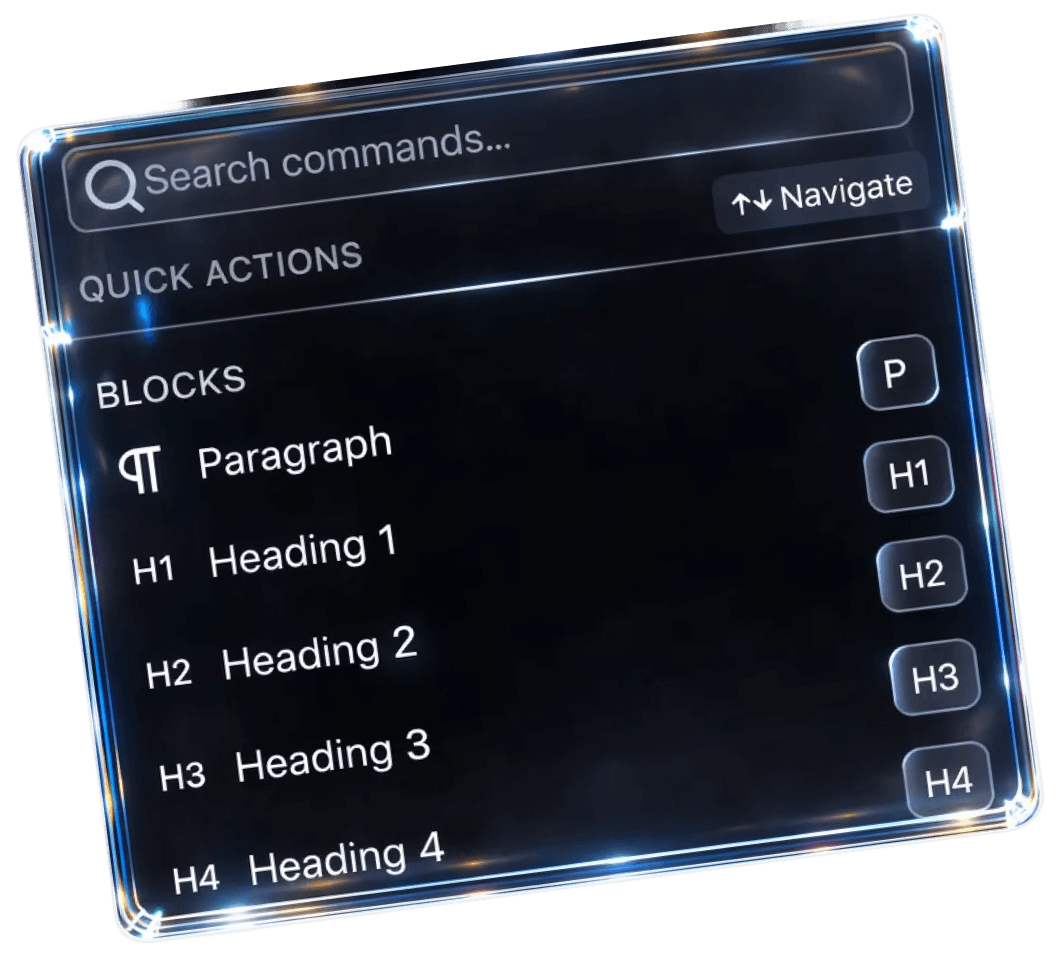
Quick Toolbar
Insert headings, lists, tables, media, and formatting instantly with slash commands. Notion-style Quick Toolbar built for distraction-free writing.
- Slash-command powered
- One-step block insertion
- Built for speed-focused writing

Floating Toolbar
Format and edit selected text instantly — Eddyter's floating toolbar appears next to your cursor with formatting, links, and inline editing tools.
- Triggered by selection
- Fast, in-context actions
- Zero workflow interruption
- floating toolbar editor
- selection toolbar rich text
- context-aware toolbar
- hover toolbar WYSIWYG
- WYSIWYG bubble menu
- React floating toolbar

Rearrange Content
Eddyter’s Rearrange Content feature lets you reorder content blocks instantly using drag-and-drop while preserving layout, formatting, and structure.
- Safe content reordering
- Layout-preserved changes
- Consistent structure

Generate AI Image
Generate custom AI images from text prompts directly inside your editor — inserted inline with your content, no external graphics tools needed.
- Text-to-image generation
- Inline image insertion
- No external tools required
- AI image generation editor
- text to image WYSIWYG
- in-editor image generation
- image generation API editor
- content AI image generator 2026

Switch to HTML
Toggle between Visual and HTML view inside your editor — edit source code directly, see live preview, switch back instantly.
- Visual ↔ HTML toggle
- \Edit source code directly
- Real-time preview support

Content Preview
Automatically generate clean, editable previews when links are added to your content — without breaking layout or formatting.
- Real-time content rendering
- Clean, readable formatting
- Consistent preview across content types

Report a Bug
Capture and report bugs directly from inside your editor — with full context, centralized tracking, and zero external tool setup.
- In-editor bug reporting
- Centralized issue tracking
- Faster issue resolution
- in-editor bug reporting
- in-app bug capture editor
- WYSIWYG bug reporting
- React bug capture component
- in-editor issue tracking 2026

Suggest Feature
A built-in feedback option that lets users suggest features directly from the editor — no external tools, no scattered communication.
- In editor feature requests
- Centralised feedback collection
- User driven improvements

Table
Rich tables with built-in merge, resize, and responsive layouts — no third-party tools, no broken formatting on mobile.
- Rich table editing
- Consistent structure
- Clean, responsive layouts

Link Preview
Paste any URL and Eddyter automatically generates a rich preview with image, headline, and description — no manual formatting needed.
- Auto-generated previews
- Clean, readable links
- Consistent presentation
- link preview generator
- Open Graph preview editor
- embed link preview

Enhance with AI
Refine, simplify, adjust tone, and rewrite content with built-in AI — without leaving your editor or losing your voice.
- Rewrite and refine text
- Improve tone and readability
- Keep original intent intact

Make Longer & Shorter
Expand brief content with relevant detail or shorten verbose passages — AI adjusts length while preserving tone, intent, and meaning.
- Better flow
- Supporting Details

Simplify
AI-powered simplification that turns complex writing into clear, plain language — without changing your voice or losing the meaning.
- Complex ideas
- Simple words

Signature
Apply branded signatures and sign-off blocks to any document automatically — saved once, used everywhere, with consistent formatting.
- Auto applied signatures
- Centralised management
- Consistent branding

Adjust Tone
Shift writing tone with AI — formal, casual, friendly, professional — without rewriting your content. One click, inside your editor.
- No Retyping
- No manual rewriting
- Right Tone

Translate
Translate content into 50+ languages inside your editor — AI preserves tone, formatting, and meaning, not just words.
- Resize
- Global
- Communication

Fix Grammar
AI-powered grammar and spelling correction built into your editor — fixes errors without changing your voice or rewriting your content.
- Text Correction
- Documentation
- Align Images
- grammar checker editor
- AI grammar correction
- WYSIWYG grammar check
- rich text editor with grammar
- Grammarly alternative editor
- AI spell checker editor
- grammar fix WYSIWYG
- proofreading editor
- content correction tool 2026

Record & Transcribe
Record your voice directly inside the editor and instantly convert it into clean, editable text.
- Speak your ideas
- Audio into text
- Note-Taking

Image Resizing
Resize, align, and upload images directly inside your editor — drag to resize, position with one click, no external tools needed.
- Resize
- Control
- Align Images
- image resizing editor
- WYSIWYG image resize
- rich text editor image alignment
- drag-resize images editor
- inline image resize 2026

Charts
Insert charts directly inside your editor — bar, horizontal bar, and more. Input data and customize visuals without leaving the document.

Embed Links
Paste links from YouTube, Loom, Figma, and other supported sources — Eddyter automatically embeds them as interactive, resizable content.
- Allows Youtube
- Loom and Figma Embeds

Comment on Text
Attach comments to selected text and collaborate directly inside your document — feedback stays anchored to context, threaded for clarity.
- rich text editor with comments
- WYSIWYG comments
- annotation editor
- contextual comments rich text

Mentions
Tag teammates with @mentions inside your editor — instant notifications, contextual collaboration, no chat tool switching.
- @mentions editor
- rich text editor mentions
- WYSIWYG with @mentions
- Notion-style mentions
- @tag editor
- mention notifications WYSIWYG

Insert Code Block
Insert syntax-highlighted code blocks directly inside your editor — multiple programming languages, clean formatting, developer-ready output.
- Syntax Highlighting
- Multi-Language
- Clean Formatting
Take action for
effort less edit experience